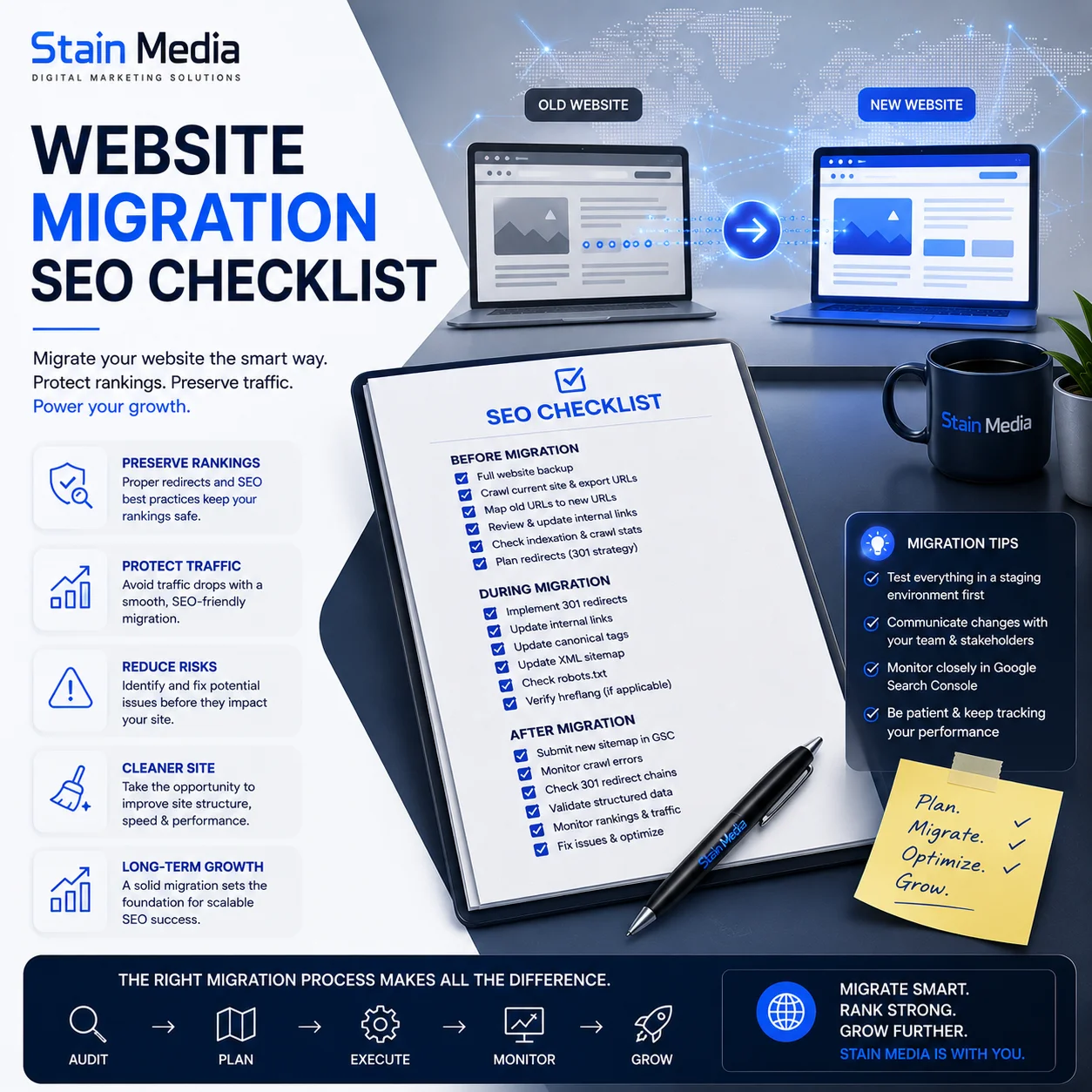
For marketing managers and digital directors, a website migration or comprehensive redesign is often a double edged sword. On one hand, it represents an exciting evolution of your brand’s digital presence better user experience (UX), enhanced features and modernised aesthetics. On the other hand, it is fraught with severe commercial risks. A poorly executed migration can erase years of hard-won organic visibility overnight, causing lead generation pipelines to dry up and revenue to plummet.
Search engines like Google rely on consistency. When URLs change, content is shifted, or a new Content Management System (CMS) is introduced, search algorithms must re-evaluate your entire domain. Without a meticulous website migration seo checklist in place, you risk losing your established authority. This guide provides marketing managers with a highly technical, fail-safe blueprint for preserving organic traffic, ensuring that your digital evolution is a step forward, not a catastrophic step back.
Understanding the Stakes: Why You Need an SEO Migration Strategy
A website migration is a blanket term that can refer to several different technical overhauls. It might involve moving from a .co.uk to a .com, switching platforms (e.g., migrating from Magento to Shopify), moving from HTTP to HTTPS, or undertaking a massive structural and visual redesign.
Regardless of the type of migration, the primary threat remains the same: search engines losing track of your most valuable assets. If a high-performing landing page is deleted or moved without a proper redirect, Google will serve users a 404 error, and your rankings for that specific topic will vanish. This is why a proactive seo migration strategy is not merely an IT task; it is a critical marketing imperative.
Executing effective website redesign seo requires cross-departmental alignment between web developers, content teams, and SEO specialists. It requires mapping the old world to the new world flawlessly. For marketing managers overseeing this transition, having access to comprehensive digital marketing solutions and specialist oversight is often the difference between a seamless launch and a post-launch disaster recovery operation.
Pre-Migration Planning: The Foundation of Success
The most critical phase of any migration occurs weeks, or even months, before the new website goes live. Preserving rankings during migration is impossible if you do not have an exact, data-driven understanding of how your current website performs.
1. Crawl and Benchmark the Legacy Website
Before a single line of code is changed, you must create a comprehensive snapshot of your existing site. Use enterprise-grade crawling software (such as Screaming Frog SEO Spider or Sitebulb) to scrape every single URL on your current domain.
- Identify Top-Performing Assets: Cross-reference your crawl data with Google Analytics and Google Search Console. Highlight your top pages by organic traffic, conversions, and assisted revenue. These are your “VIP” pages; their preservation is your highest priority.
- Document Baseline Metrics: Record your current keyword rankings, domain authority metrics, and site speed scores. This benchmark data will be essential for diagnosing drops in performance post-launch.
2. Block the Staging Site from Search Engines
During the development phase, your new website will live on a staging server. It is absolutely vital that this staging environment is hidden from search engines. If Google indexes your staging site, you will create a massive duplicate content issue before the new site is even launched. Ensure your development team implements a robust password protection (HTTP authentication) on the staging server or at the very least, applies a strict Disallow: / directive in the staging site’s robots.txt file.
3. Evaluate Content Pruning and Consolidation
A migration is the perfect time to clean house. However, marketing managers must approach content pruning with surgical precision. If a page has zero organic traffic, zero backlinks, and zero conversions over the last 12 months, it is a candidate for deletion (or consolidation). Conversely, if a page drives traffic but is outdated, it should be flagged for rewriting rather than removal. Every page you decide to remove must be accounted for in your redirection strategy to prevent link equity loss.
Technical SEO Checks: Securing the Architecture
Once the staging site is built and the content is populated, the technical SEO verification phase begins. This is where meticulous attention to detail prevents launch-day disasters.
Redirect Mapping
If there is one aspect of migration that dictates success or failure, it is Redirect Mapping. When you change a URL even slightly, such as removing a trailing slash or changing a category folder you must tell search engines where the old page has moved. This is achieved via permanent 301 redirects.
A 1-to-1 redirect map is a spreadsheet that pairs every single URL from your old website with its exact corresponding URL on the new website.
- The Golden Rule of Redirects: Never redirect all your old pages to the new homepage. This is a common, lazy tactic known as a “soft 404,” and Google actively penalises it. If an old page about “Cloud Telephony Solutions” is moving, it must redirect to the new “Cloud Telephony Solutions” page. If that exact page no longer exists, it should redirect to the closest relevant parent category.
- Avoiding Redirect Chains: A redirect chain occurs when URL A redirects to URL B, which then redirects to URL C. This forces search engine crawlers to jump through multiple hoops, wasting “crawl budget” and diluting the PageRank (authority) passed to the final destination. Your map must ensure that all old URLs point directly to their final 200 OK destination.
- Transferring Backlink Equity: The internet is likely littered with links pointing to your old URLs. 301 redirects ensure that the SEO value of those inbound links is seamlessly transferred to your new domain. Failing to redirect a page that has a high volume of valuable external backlinks is akin to throwing digital marketing budget down the drain.
Due to the sheer complexity of mapping thousands of URLs without creating infinite loops or logic errors, acquiring expert SEO guidance during this specific phase is highly recommended. It is a highly technical process where even a single misplaced character in an .htaccess file can break an entire directory.
Updating Internal Link Architecture
While implementing 301 redirects ensures that external backlinks find their way to your new pages, you should never rely on redirects for your internal links.
If your new homepage links to a service page, but that link points to the old URL (which then redirects to the new URL), you are forcing search engines to process an unnecessary redirect hop every single time they crawl your site. This wastes valuable crawl budget and slows down page rendering for users. Marketing managers must ensure their development teams run a “search and replace” operation across the entire new database. Every internal link, button, and navigation menu must point directly to the final, 200-status destination URL on the new domain.
Validating Canonical Tags
Canonical tags (rel="canonical") act as a definitive signal to Google, indicating which version of a page is the “master” copy. During a website redesign, these tags often break. A common, disastrous mistake is launching a new website where the canonical tags are still pointing to the staging environment URLs or the legacy .co.uk URLs.
Before the site goes live, conduct a thorough audit of the staging environment to ensure all canonical tags are self-referencing the correct, updated URLs. If your website redesign seo involves merging multiple similar pages into one comprehensive guide, ensure the canonical tags of any secondary pages point clearly to the newly consolidated master page.
The XML Sitemap Strategy
Your XML sitemap is the roadmap you hand directly to search engines. During a migration, your sitemap strategy requires a very specific, two-pronged approach:
- Generate the New Sitemap: Create a pristine, error-free XML sitemap containing only your new, 200-status URLs. Ensure it contains no 404s, redirects, or canonicalised URLs.
- Keep the Old Sitemap Live (Temporarily): Do not immediately delete the XML sitemap of your old website. Instead, leave it live in Google Search Console for several weeks. Why? Because you actually want Google to crawl your old URLs as quickly as possible so it can discover the 301 redirects you have set up. Once you see that the old URLs are dropping out of the index and the new ones are replacing them, you can safely remove the legacy sitemap.
Launch Day: The Critical Switch
The day you push the new website live is a high-stakes event. For marketing teams, this is not the time to celebrate; it is the time for rapid, intensive verification.
Immediate Launch Checklist:
- Remove the Blockers: The instant the site is live, you must remove the HTTP authentication password and update the
robots.txtfile to allow search engine crawling (changingDisallow: /to allow normal indexing). Forgetting this step is the single most common reason websites vanish from Google post-launch. - Submit to Google Search Console: Log into your GSC account and submit your new XML sitemap immediately. You can also use the “URL Inspection” tool to manually request indexing for your homepage and key commercial hubs.
- Test the Redirects in Real-Time: Do not assume your redirect map worked perfectly. Manually test your highest-priority legacy URLs (and those with the most external backlinks) in a live browser to ensure they seamlessly land on the correct new pages without looping or breaking.
Post-Migration Monitoring: Preserving Rankings During Migration
A successful seo migration strategy does not end on launch day. Search engines require time to process the massive volume of changes across your domain. During the first two to four weeks post-launch, you will likely experience what SEO professionals call the “Google Dance” a period of ranking volatility where your traffic may fluctuate by 10% to 15%. This is entirely normal.
However, to ensure this volatility settles into long-term growth rather than a permanent decline, marketing managers must implement strict post-launch monitoring protocols.
1. Monitor Index Coverage Daily
Use the “Pages” report in Google Search Console daily. You want to see a steady increase in the number of indexed pages (representing your new site) and a corresponding decrease in the indexed URLs of your old site. Keep a close eye on the “Not Indexed” section. If you see a sudden spike in “Soft 404s” or “Page with redirect” errors targeting your new URLs, you have a critical architectural flaw that needs immediate developer intervention.
2. Track Keyword Volatility
Utilise enterprise rank-tracking software (like Semrush, Ahrefs, or SE Ranking) to monitor your VIP keywords. While slight dips are expected in week one, a complete disappearance of your primary commercial terms indicates that a redirect has failed or the on-page content of the new page does not satisfy the search intent as well as the old page did.
3. Analyse User Engagement Metrics
Organic traffic is only half the equation. You must monitor your new Google Analytics 4 (GA4) property to ensure the website redesign seo has actually improved the user journey. Look closely at engagement rates, bounce rates, and conversion paths. If traffic remains stable but lead generation forms are suddenly seeing an 80% drop-off, you may have a UX or mobile rendering issue on the new template that is deterring prospects.
Conclusion Securing Your Digital Future
Migrating a website is one of the most complex digital transformations a business can undertake. For marketing managers, the pressure to deliver a visually stunning, highly functional new website while simultaneously protecting the company’s primary source of inbound leads is immense.
By adhering strictly to a comprehensive website migration seo checklist, you shift the narrative from risk mitigation to aggressive digital growth. Proper redirect mapping, technical architecture validation, and rigorous post-launch monitoring ensure that you are not just preserving your current search visibility, but setting a stronger, more scalable foundation for future SEO campaigns.
Navigating the technical intricacies of a major site move without dedicated support is a gamble that commercial entities simply cannot afford. If your business is planning a replatforming, domain change, or large-scale redesign, partnering with seasoned specialists provides the assurance that your digital assets are protected. To ensure your next migration is executed flawlessly and your organic revenue remains intact, explore the expert guidance available at Stain Media and reach out to our technical team via our contact us page today.
